Weather
The frame can show the current weather for your location beside the clock: the outdoor temperature and an icon for the sky. It reads from OpenWeatherMap, so it needs a free API key. Without one, weather stays off and the frame leaves it out. Set it up under Settings → Weather. These are current conditions, not a forecast.
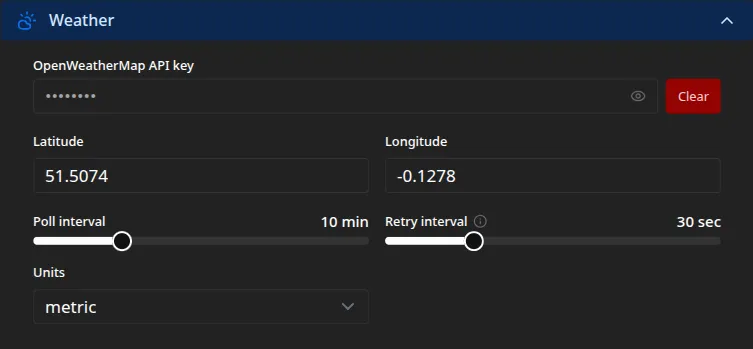
What it shows
Section titled “What it shows”On the frame, weather is the outside reading: the current temperature and an icon for the sky, such as clear, cloudy, or rain. The kiosk display shows where it sits.
If you also have an outside temperature sensor, its reading takes priority, and weather fills in only when no sensor reading is current. The sky icon always comes from weather.
Setting it up
Section titled “Setting it up”- OpenWeatherMap API key. Create a free account at openweathermap.org, generate a key, and paste it here. Leaving it empty turns weather off.
- Latitude and Longitude. Your location as decimal coordinates, for example
51.5074and-0.1278. To find yours, look them up on latlong.net or right-click your spot in a maps app. - Units.
metricfor degrees Celsius,imperialfor Fahrenheit, orstandardfor Kelvin. This sets how the temperature reads on the frame.
How often it updates
Section titled “How often it updates”- Poll interval. How often the frame fetches fresh conditions. The default is ten minutes, which sits well within the free tier’s limits.
- Retry interval. The first delay after a failed fetch. It backs off up to the poll interval, so a brief outage does not hammer the service.
Both apply the moment you save.
Every setting on this page maps to a key in the configuration reference.