The story & the hard parts
I built the first version in 2017. The Pi Zero W had just come out, and getting the whole thing to run on something that small and low-powered was the appeal. It was a challenge I enjoyed, and the low power and small size matter for something left running on a shelf.
Back then it was three programs: a PyQt5 and QML kiosk on the Pi, a .NET Core server for uploads and sensors, and an Angular web app for the interface. Room sensors over Bluetooth, motion included, were part of the idea from the start, because IoT was the word of the day. A Home Assistant link came later and made most of the .NET server redundant.
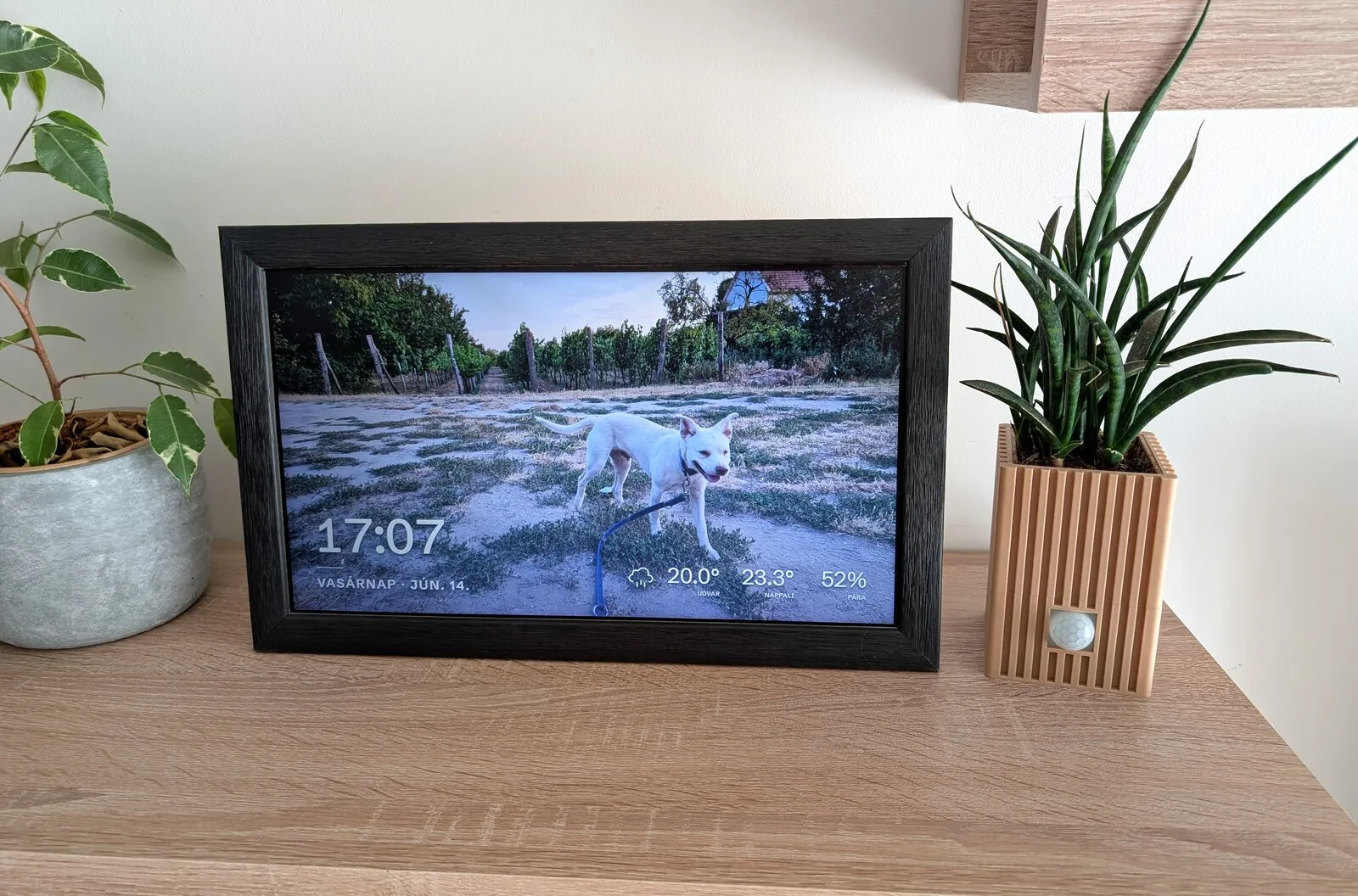
That is the frame as it sits today. The panel is a salvaged laptop screen, and the ribbed planter next to it is 3D-printed, holding the sensors: an SHT21 for temperature and humidity, a cheap PIR module for motion, and an nRF51822 to handle Bluetooth. Because it is wireless, that sensor pack can sit anywhere in the room. In our last place it lived at the far end. Here it sits right next to the frame, as in the photo. It is old hardware, and I will keep using it until it gives out. When it does, I will most likely read my room sensors through Home Assistant over MQTT instead, which the frame already supports. And if I build a few of these for family, I would swap the Bluetooth board for a wired I2C sensor for a simpler build.
Why rewrite it
Section titled “Why rewrite it”What pushed me to rebuild was mostly the maintenance, though I also wanted a few new features and a more modern stack. The Pi client needed Qt cross-compiled with the eglfs backend to run without a desktop, a fragile day-long build that was very hard to reproduce after an SD card died. I kept image backups just to stay safe. I wanted something I could tear down and rebuild from scratch quickly and predictably.
So this version is one program: a single Go binary with the admin interface, a SvelteKit app on Svelte 5, built into it. No separate server, no Angular app, no database. The filesystem holds the photos. Installing is a download, and an update replaces one file. The rest of this page is the parts that took real work, and why they ended up looking the way they do.
The crossfade
Section titled “The crossfade”Qt with eglfs had handled the photo crossfade easily. In a browser on this hardware, it turned into one of the hardest parts to get right.
A plain Svelte transition was the obvious starting point, and it was far too heavy for the Zero W. Next I tried two image layers, swapping the hidden one and animating the opacity of both as they loaded. It stuttered, but it was closer. Then I kept the two layers but animated opacity only on the incoming image. In a proof of concept it ran well, so I built the rest on top of it.
It came apart once the overlay and the SSE listeners were in place. The fade-in stayed smooth, but the fade-out had become a sudden blip. The fix was to never animate a fade-out at all. The fader only ever fades the incoming image in over the current one. When that finishes, it copies the now-visible image down to the base layer and snaps the top layer back to invisible without animating. Every transition is now a single fade-in, which the Pi Zero can render smoothly.
That handled single photos. The flaw surfaced later, while I was adding
side-by-side pairing for portrait shots: the
second pane stayed a black box until about mid-fade. Decoding a multi-megapixel JPEG is not instant
on this hardware, and an image being loaded is not the same as being ready to paint. Calling
decode() on each pane and starting the fade only once they all resolve moves that work off the
critical path, so the bitmaps are paint-ready before the animation begins. It made the single-photo
fade smoother too.
Turning the screen off
Section titled “Turning the screen off”The old app powered the screen with vcgencmd and it was reliable, so the rewrite started there
too. On its own merits it is good: light on resources, the screen never wakes itself, and a
restart of the browser comes straight back at the right resolution. The catch was that the Pi
crashed every few days. I turned on persistent logging and went through dmesg and the rest, and
found no out-of-memory, no obvious cause.
On a hunch that it was the fake-KMS driver, I moved to full KMS, the modern path anyway, and it has been stable since. That meant living with a compositor.
cog’s default is the cage compositor, and it gave me three problems: you can hide the cursor only
with an invisible cursor theme, you cannot restart the browser without taking cage down with it,
and it has no wlopm, only wlr-randr. The middle one matters more than it sounds. A recoverable
crash or an overnight update would restart the browser, and with cage that lights the screen up at
2 a.m. while it is meant to be off. That is not acceptable for something sitting on a shelf.
labwc solved all three. It is a little heavier than cage, but the cursor hides from a config file,
it supports wlopm, and it survives a browser restart, so the screen’s on-or-off state holds
across one.
That left two quirks. The screen would turn itself back on about a minute after going off: when the panel sleeps it drops its hotplug signal, the driver reads that as unplugged, and the compositor releases the output. Pinning the connector on the kernel command line, so the driver always treats it as present, settles it, and the installer writes that line. The other: the browser would come up at the wrong resolution if it restarted while the screen was off, because labwc cannot size a window against a dark output. A small launch script reads the panel’s mode directly, which it still reports while off, and tells the browser its size up front.
This whole detour is why there are two display backends. The full-KMS
path with labwc and wlopm is the default. The vcgencmd path is the legacy fallback. They set up
different system services and boot settings, so switching between them means re-running the
installer rather than changing a setting.
Living within 512 MB
Section titled “Living within 512 MB”There was no single fix for memory. It was a constant concern through the whole build, showing up as small decisions everywhere: how photos are sized and served, how events move through the app, what the kiosk loads versus what only the admin interface needs. Added up, those small decisions are what keep the whole stack, operating system included, inside 512 MB with room left for the browser.
Recovering on its own
Section titled “Recovering on its own”A frame on a shelf has to survive a bad update on its own, so the self-updater is careful in a few specific ways.
Before anything is installed, the downloaded binary is run once with a --health-check flag. That
starts a throwaway in-process server, no hardware and no socket, purely to prove the new build runs
on this device at all. If it passes, the updater keeps the current binary as a .bak, swaps in the
new one, leaves a marker file recording the version, and restarts.
The new binary then has to prove itself for real: it must produce a kiosk heartbeat within a
window. If it does, the update is committed and the backup and marker are removed. If it does not,
the process exits, and after a few failed starts systemd’s start-limit triggers a rollback unit
that restores the .bak and starts the old binary again. That unit is gated on the marker, so it
only ever acts during an update in progress. An ordinary crash-loop never triggers it. The version
that failed is recorded, skipped by future automatic updates, and surfaced once in the admin
interface so you know what happened.
Wi-Fi recovery works on the same principle: lose the known network and the frame raises its own hotspot with a captive portal, so you can point it at a new one from your phone. See Network and Software updates for how both look in use.
The frame runs on hardware from that first Pi Zero W up to a Pi 3. Most of what is above came from getting it to behave on the small end of that range.
On using AI
Section titled “On using AI”I used AI as a tool while building this, and I have nothing against it. If it is good enough for the enterprise software I write for a living, it is good enough for a home project. The productivity, real or perceived, is most of why this reached the polish it has. It let me spend my time on the parts that were fun or hard, and less of it on boilerplate and yet another CRUD endpoint.
That carries over to contributions. AI-assisted pull requests are as welcome as any other, held to the same bar. See Contributing.