Software updates
The frame keeps itself up to date. It checks for new releases on its own, can install them overnight, and rolls a failed update back without help. You can also install one by hand from the Dashboard. The automatic behavior and the release source are set under Settings → Software updates.
How updating works
Section titled “How updating works”The frame checks for a newer release at startup and once a day, whether or not automatic updates are on. When one is available, a badge appears on the Dashboard.
Installing an update downloads it, verifies its signature and checksum, swaps it in, and restarts the frame on the new version.
Updates replace the frame’s program, not the system packages or boot scripts the installer set up. When a new feature needs one of those, its section in this manual says so; rerunning the install script brings everything current and keeps your settings.
Automatic installs are limited to the same version line. Releases follow semantic
versioning, written major.minor.patch (for example 1.4.2). A new minor or patch, like
1.4.0 or 1.3.2, only fixes or adds things and keeps working with your existing setup, so the
frame installs it on its own. A new major, like 2.0.0, is the release that is allowed to
change behavior or configuration in ways that could need your attention, so the frame surfaces it
but waits for you to install it by hand, once you have read what changed. That way an unattended
overnight update can never reconfigure the frame out from under you.
Installing an update
Section titled “Installing an update”When a release is available, the Dashboard shows an Update available panel. Install it from there. The About dialog also has a Check for updates button to look right away. Both are covered on the Dashboard page.
Automatic updates
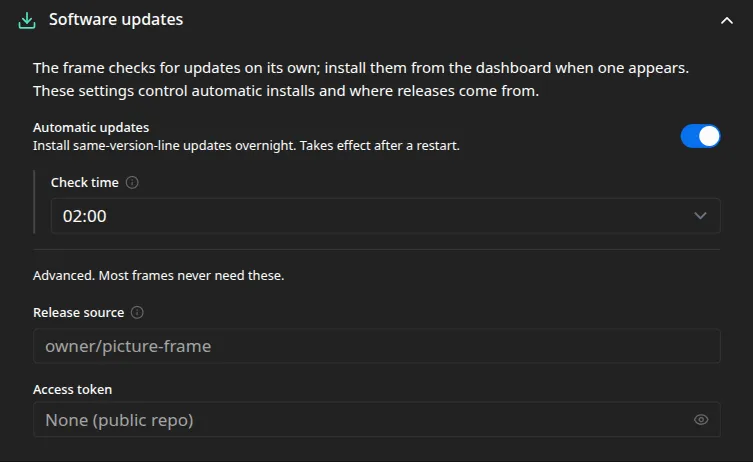
Section titled “Automatic updates”Turn Automatic updates on to install same-line updates overnight, at the Check time in the frame’s local hour. It is on by default, at 02:00.
If an update fails
Section titled “If an update fails”Safety is built in. The frame checks that a new version comes up after it restarts. If it does not, the frame restores the previous version on its own, so an update cannot leave it stuck. A version that rolled back is not retried automatically, though you can still install it by hand once the cause is sorted out.
Release source
Section titled “Release source”Most frames never need this. It is meant for forks and private builds.
- Release source is the GitHub repository, as
owner/name, to fetch releases from. Leave it blank to track the official releases. - Access token authenticates against a private release source.
Every setting on this page maps to a key in the configuration reference.